
On 27 Oct 2026 Surge AI published DAYJOB: Tax, a test where 16 AI models had to do 50 real tax assignments written by tax experts. The best model passed 10.8% of them. This kit shows where they fail and how I'd use AI for taxes anyway: for the busy work, never for the final call.
#1. What the test found
- 50 assignments in 8 areas: individuals and families, small businesses, partnerships, property and investments, estates and trusts, international tax, corporate transactions, reviews and disputes.
- 1,789 files: PDFs, Excel sheets, Word files, emails, images, handwritten receipts.
- Pass rule: an attempt passes only if it meets at least 95% of the expert checklist (calculations, evidence, the issues that matter, the finished deliverable).
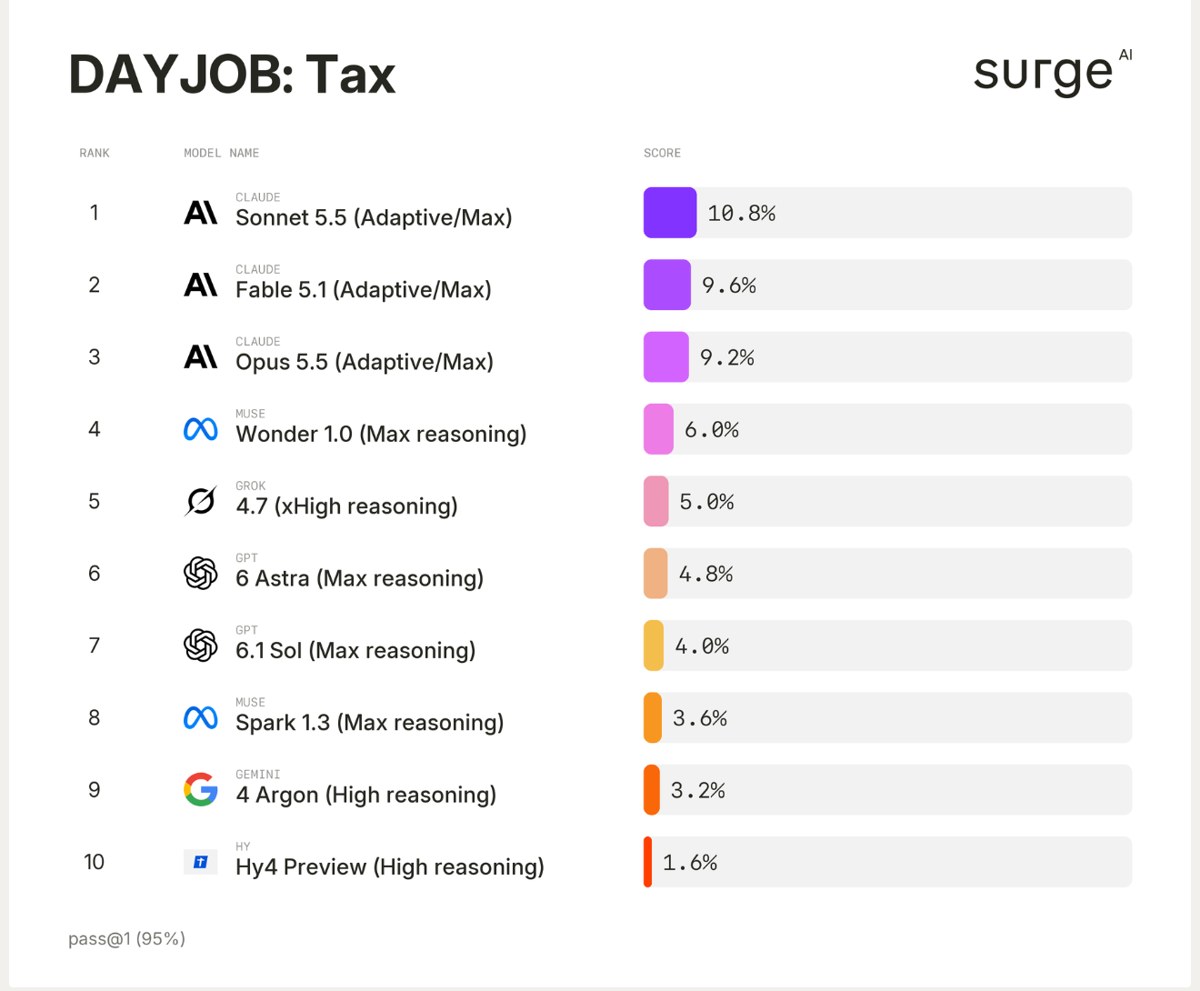
| Model | Passed |
|---|---|
| Claude Sonnet 5.5 | 10.8% |
| Claude Fable 5.1 | 9.6% |
| Claude Opus 5.5 | 9.2% |
| Muse Wonder 1.0 | 6.0% |
| Grok 4.7 | 5.0% |
| GPT-6 Astra | 4.8% |
| GPT-6.1 Sol | 4.0% |
| Gemini 4 Argon | 3.2% |
| Kimi K3, Mistral Large 4, Qwen 3.8 Max | 0% |
#2. Where the AI went wrong
The missed deadline. Anna moved out of her flat in August 2024 and asked: sell in October 2026 or January 2027? The AI checked both dates correctly. It never told her that she would lose a tax break worth up to $250,000 if the sale slipped past August 2027. GPT-6 Astra missed this in 5 of 5 attempts, Claude Opus 5.5 caught it in 5 of 5.
The wrong assumption. A separating couple asked about splitting their accounts. Claude Opus 5.5 assumed they were not legally married in all 5 attempts and built its whole answer on that, although their records raised doubts. GPT-6 Astra checked the marital status first in 4 of 5.
The lesson: every model has a different blind spot, and none of them tells you what it missed. The math is rarely the problem. The problem nobody mentioned is.
#3. What I use AI for, and what not
| Use AI for | Don't let AI decide |
|---|---|
| Sorting receipts into a table | Anything with a deadline |
| Checking totals and sums | Selling or buying property |
| Finding missing documents | Moving between countries or cantons |
| Explaining a form in plain words | Separation, divorce, inheritance |
| Listing questions for your adviser | Starting a business |
#4. Five prompts to copy
Use them in Claude or ChatGPT. Remove your AHV number, IBAN and address before you upload anything (or run a local model, see sangeeths.ai/local).
1. Sort the receipts
Here are my receipts and bank exports for the tax year. Put every item into one table with these columns: date, vendor, amount, currency, category, file name. If you can't read a value, write UNCLEAR instead of guessing. At the end, list every file you could not use.2. Check the math
Recalculate every total in this table step by step. Show each calculation. If your result is different from mine, list the row, my number, your number and the reason. Do not change any number silently.3. Find the blind spots
Act like a careful tax adviser. Before you answer my question, list everything I did not ask about but should have: deadlines, eligibility conditions, residence rules, marital or family status, income from other countries or cantons, missing documents. For each one, say how it could change the answer.4. Show your assumptions
List every assumption you made in your last answer. For each one, tell me which document would prove it and what changes in your answer if the assumption is wrong.5. Every date that matters
Go through all the documents I gave you and list every date and deadline that matters for my taxes, sorted by date. For each one, say what happens if I miss it. Mark the ones you are not sure about.#5. Red flags: call a professional
- You sell or buy property, or plan to.
- You moved between countries or cantons during the year.
- You separated, married, divorced or inherited.
- You started freelancing or a company.
- A deadline is close and real money depends on it.
#6. Notes for Switzerland
- The test uses US tax rules. Switzerland taxes at three levels (federal, cantonal and municipal), and every canton has its own forms, deductions and deadlines.
- Check the deadline and possible extensions on your canton's tax office website, not with an AI.
- Most cantons offer their own tax software or online filing. Use AI next to it to sort and check, not to fill it in for you.
#Sources
- Surge AI, DAYJOB: Tax, Benchmarking AI Agents on Professional Tax Work, 27 Oct 2026
- Surge AI, benchmark leaderboards
This kit is not tax advice.
Made by @sangeeths.ai: real AI engineering from Switzerland. Share this kit: sangeeths.ai/tax · All free kits: sangeeths.ai